How to Switch Windows of the Same App on a Mac
Published · 6 min read
Command-Tab switches apps. It does not pick a window inside the app. To move between windows of the app already in front, press Command-` (the key above Tab on a US keyboard). To see all of those windows at once, press Control-Down Arrow. To see a picture of each one before you click, hover the app’s icon. Apple’s Dock lists titles. A live thumbnail is a separate feature.
Which shortcut does what?
These are the defaults on macOS. System Settings → Keyboard → Keyboard Shortcuts can reassign them. On a keyboard without a grave accent, the cycle-windows shortcut is still the key in that position, often next to the number 1.
| Action | Default shortcut | What you see |
|---|---|---|
| Switch apps | Command-Tab | One tile per app. Twelve browser windows are still one tile. |
| Next window of the front app | Command-` | The following window of that app, one at a time. |
| All windows of the front app | Control-Down Arrow | App Exposé tiles those windows. Click one. |
| Every window on the Mac | Control-Up Arrow | Mission Control, across apps and desktops. |
| Windows of one Dock icon | Click and hold the icon | A menu of window titles for that app. |
Why Command-Tab feels like it skipped the window
Command-Tab’s row is apps. Safari, Chrome, or an editor with several projects is one icon until that app is frontmost. After you land on it, Command-` walks its windows in order. You find the right one by watching the screen change, which is slow when the titles look alike.
Control-Down Arrow skips the walk. It lays out the front app’s windows and you click. It only covers the app already in front. If the window you want belongs to an app behind the current one, you still Command-Tab first, then Exposé.
Click and hold a Dock icon, or two-finger click it, opens the window menu without bringing a random window forward. The menu is names. Two documents with the same title are two identical rows.
When a picture of the window is the point
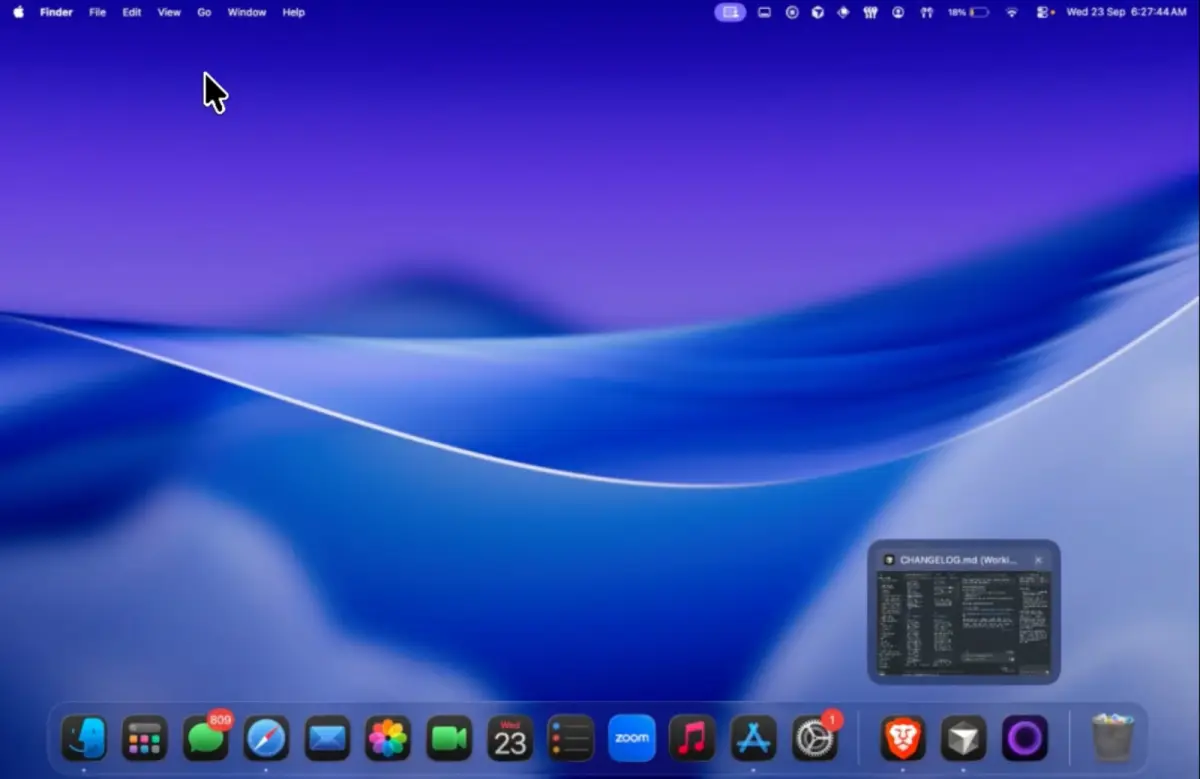
A title tells you the file name. A thumbnail tells you which draft, which browser window, which terminal. Ordin draws that thumbnail when you hover an icon, on Apple’s Dock and on every extra dock. Click the picture and that window comes forward.
The docks themselves do not need a privacy grant. The picture does. macOS asks for Screen Recording before a hover can show the window. Browser tabs inside that preview also need Accessibility. Skip both if you only want icons. Thumbnails stay on the Mac. The shorter note on the popover is live window previews on a Mac dock.
Hover is useful once the icon is already on the screen you are looking at. macOS still has one Dock, so the icon may be on the laptop while you are on the external display. A second dock on that display puts the icon under the pointer. That layout is a dock on the external monitor.
Questions
What is the shortcut to switch windows of the same app on a Mac?
Command-`, the grave accent above Tab on a US keyboard. It cycles windows of the frontmost app. Command-Tab switches apps.
How do I see every window of one app at once?
Control-Down Arrow opens App Exposé for the front app. Click the window. Change the shortcut in System Settings → Keyboard → Keyboard Shortcuts if that combination is taken.
Can the Mac Dock show a preview of open windows?
Apple’s Dock shows a list of titles when you click and hold an icon. A live picture on hover comes from an app that has Screen Recording. Ordin does that on Apple’s Dock and on an extra dock. The 2-day trial includes it, with no account. The license after that is $12.99 once for this Mac.
Hover the icon that has too many windows. If the picture is the one you wanted, click it. The trial is 2 days.
Download for MacOr pay $12.99 if you already know you want it.
Related: Live window previews · Can a Mac have more than one Dock? · Is a second dock worth $12.99?